

I have a one-cycle delay in my AI marketing tooling. I started with n8n when everyone moved to Claude Code. Moved to Claude Code after OpenClaw got hyped. And now I’m trying to catch up before the next thing drops.
After just two weeks of building Obsidian vaults with Claude Code and Codex, writing custom instructions and using my own marketing frameworks, I’m already far more productive than with my n8n workflows. The output is better too. Agents iterate and make better decisions, so the results are noticeably stronger.
But I still feel completely behind.
That’s the real FOMO in AI right now. “Innovators,” the first 2.5% on the adoption curve, hit the limits of one tool, build the next one, adopt it, hit its limits, and repeat. Each cycle shorter than the last. If you’re an early adopter, you’re picking up the tool they just left behind. By the time you’re productive with it, they’ve moved on twice.
So you end up feeling 6 months behind while being years ahead of everyone else.
Instead of chasing the next thing, I want to share the actual workflow that’s working for me right now. It’s three pieces: Obsidian, a dictation app, and AI agents.
Obsidian with the PARA method
I use Obsidian as my knowledge base, structured with the PARA method from Tiago Forte. PARA stands for Projects, Areas, Resources, and Archives. It’s a way to organize information by how actionable it is rather than by topic.
I keep one vault per client. Then one vault for my agency’s own marketing. And one personal vault. Maybe I could just make one vault for everything, but it feels confusing.
Here’s how each folder works in practice:
Areas hold every repeatable process I run. Market research, positioning, landing page copywriting, each one gets its own folder with docs like styleguides, templates, examples, and instructions.
Projects hold active work. If I’m writing a landing page, it gets a project folder. When I’m done, it moves to Archives.
Resources hold everything I know about a client. Go-to-market strategy docs, competitive intelligence, blog posts, external competitor resources. I try to put as much detail here as possible because the more context my agents have, the better their output.
Archives are just done projects, moved out of the way.
The key piece that connects Obsidian to AI agents is two files: a CLAUDE.md and an AGENTS.md at the root of each vault. These files point the agent to the right instructions for whatever process I’m running. When I open Claude Code or Codex in a vault, the agent reads those files and knows where everything is.
100K words dictated in a month
This is where 80% of my productivity boost comes from. Not the AI agents, not the fancy vault structure, but a dictation app.
I use Monologue, but Whisprflow or similar works too. The point is voice-to-text for writing prompts and rough notes.
On prompting alone, I write between 1,000 and 2,000 words a day according to my app’s analytics. Before dictation, it was <500. My prompts are far more detailed now, and because of that, my results are far better.
But the UVP for dictation apps isn’t speed in my opinion. What it helps the most with is procrastination.
When you’re faced with writing 500 to 1,000 words of detailed instructions, you’re probably not going to do it. If it’s not urgent enough, you’ll push it off. But talking for five to ten minutes and feeding that to an AI to clean afterwards? That feels doable. So I actually do it.
That shift, from “I need to write a detailed prompt” to “I’ll just talk through what I want,” changes what gets done in my day. Tasks that would sit on my list for a week get handled in a morning because the barrier dropped from typing to talking.
AI agents
I use Claude Code and Codex as my agents. I either open the terminal and work from there, or I use the desktop app, which is better for less technical workflows.
The workflow is conversational. I open the vault, the agent reads my instructions, and I start talking about what I need. The agent iterates with me. If something isn’t right, I tell it and we adjust.
This is where agents beat fixed automation tools like Make, Zapier, or n8n for my use case. Those tools do things automatically, and you need to wire each step correctly. If the output isn’t right, you go back, adjust a node, re-run. It’s enough friction to make you procrastinate on improving your workflows.
NB: You can make agentic workflows with these tools too, but it’s more friction than using Claude Code.
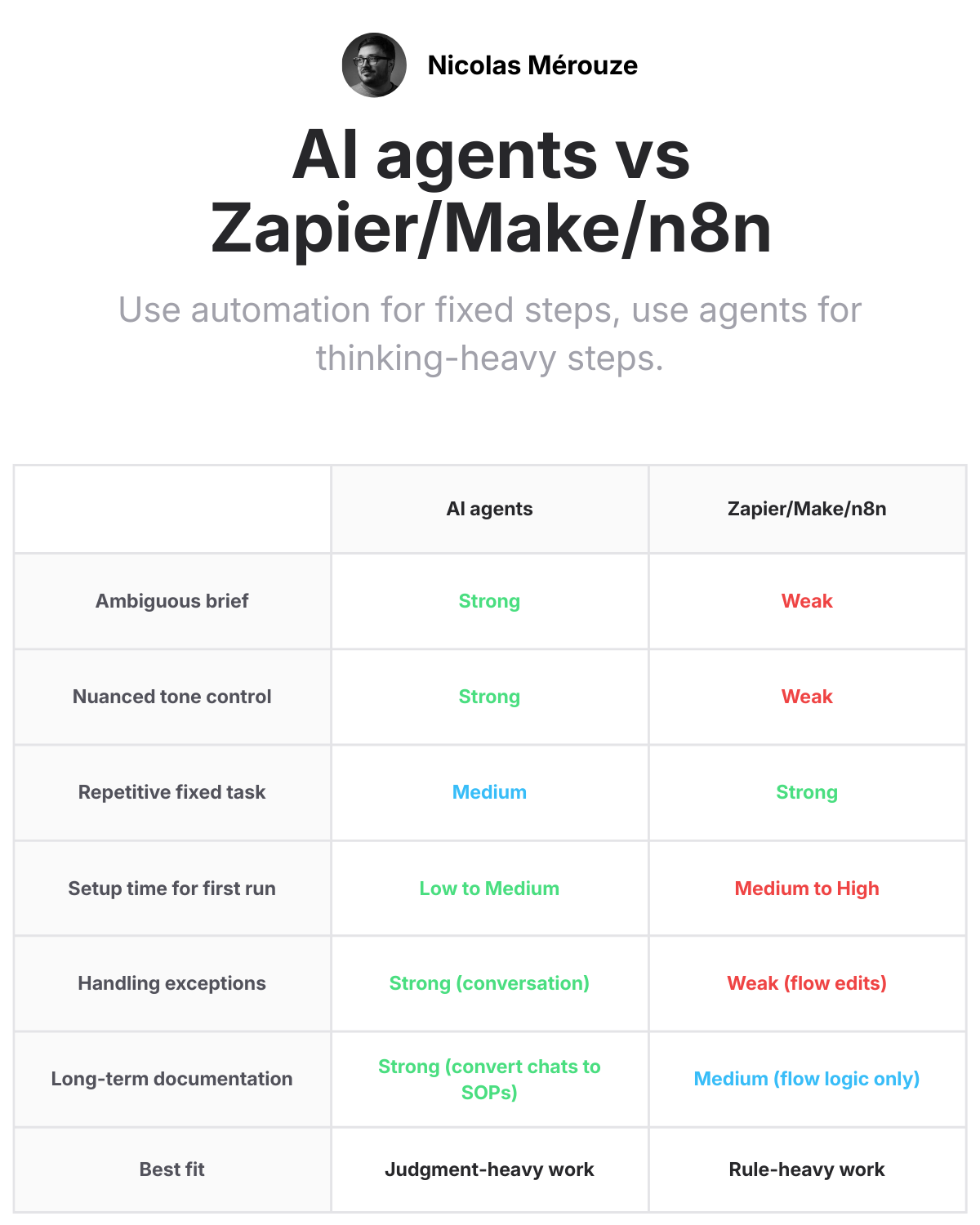
With agents, I just talk. The conversation is the workflow. And because I’m dictating, I can be very specific about the small subtleties I want without it feeling like a chore.
One tip I’ve found useful: if I don’t have formal instructions for a process yet, I just dictate it live. “Do this, then that, then this.” The agent follows along and produces the output. When I’m satisfied with the result, I say “take everything we just discussed and turn it into reusable instructions.” Now that process is documented and ready for next time, without me ever having to sit down and write a process doc.
How it all connects
The three pieces compound.
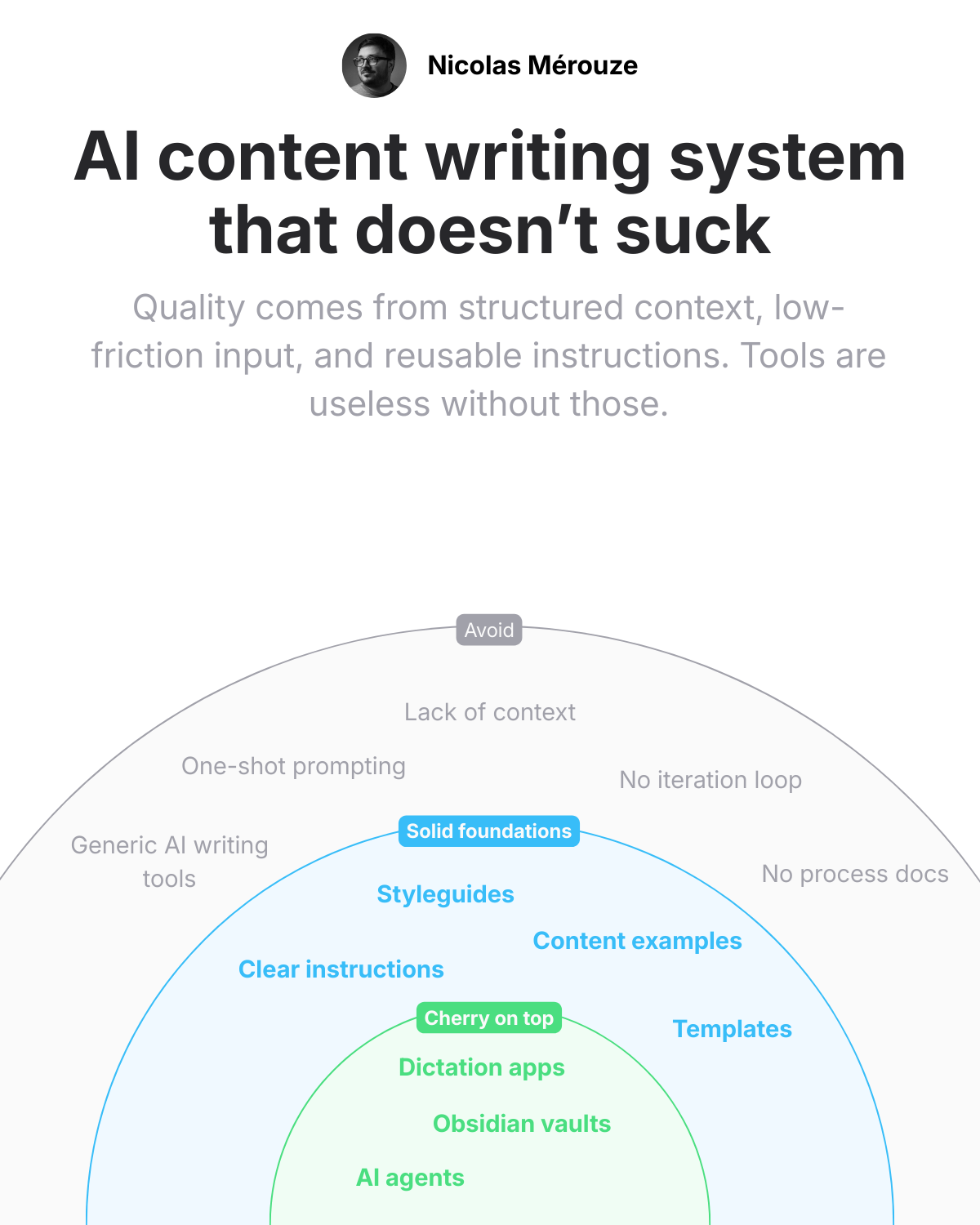
Obsidian gives structure. Every vault has clear areas, active projects, and deep resources. The agent knows where to look and what standards to follow.
Dictation feeds the agents with detailed, specific prompts. I talk through exactly what I want, and because talking is low friction, I actually give the agent enough context to do good work.
The agents iterate inside that structure. They read my instructions, follow my styleguides, and produce output that gets better each round. And the conversations themselves become the source material for new instructions.
Each project makes the next one faster. The instructions get tighter. The resources get richer. The agent needs less correction. It’s a compounding loop.
This post is proof
I want to be honest about something. This post was written with the same workflow I just described. I didn’t type it. I talked through my ideas using my dictation app (~1400 words transcribed), fed my notes to Claude, built an outline together, validated it, and produced this.
Every idea here is mine. The structure of the workflow, the insight about procrastination, the tips about converting conversations to instructions. But I didn’t write a single sentence with my keyboard (I edited things I didn’t like of course).
The post is my own. The writing process just looks different now.
If you’re still chasing the perfect AI tool, consider that the biggest productivity gain might not come from the agent itself. It might come from making it easier to talk to the agent. A $10/mo dictation app changed my output more than any framework or automation platform.